Getting Started
Installation
Django Anchor is installed just like any other Django package:
add the package as a dependency
add
anchorto yourINSTALLED_APPSsettingadd
anchor.urlsto your URL configrun
python manage.py migrateto create the necessary tables
Check out the installation guide for more details, including how to install the optional dependencies for image transformations.
Introduction
Django Anchor allows you to add files to your Django models. It is essentially a
clone for Ruby on Rails’ ActiveStorage ported to Python and following the
conventions of the Django ecosystem. Django Anchor replaces Django’s FileField
and ImageField and enhances them with a few features:
Allows generating and serving variants of image files. You can dynamically resize and otherwise transform images to serve optimized versions straight from a template tag.
Allows generating and serving signed URLs for files, even when using the default file-system storage backend.
Removes the need for additional columns in models to store references to files. Instead, Django Anchor tracks file attachments using a generic relationship.
Single File Attachments
Let’s say you have a Movie model and want to upload cover images. First, add
a SingleAttachmentField
to your model:
from django.db import models
from anchor.models.fields import SingleAttachmentField

class Movie(models.Model):
    title = models.CharField(max_length=100)
    cover = SingleAttachmentField()
That’s pretty much it! No need to run makemigrations or migrate since
Django Anchor doesn’t actually need any columns added to the model.
The cover field works just like any other model field:
# Create a new movie
movie = Movie.objects.create(title="My Movie")

# Attach an uploaded file
movie.cover = uploaded_file

# Get a URL to the file
movie.cover.url()

# Get a URL to a miniature version of the file
movie.cover.representation(resize_to_fit=(200, 200), format="webp").url()

# Delete the file
movie.cover.purge()
Rendering attachments in templates
One of the core functionalities of Django Anchor is the ability to render
versions of the original file attached to a model that are optimized for a
particular size or converted to another format. This is done using the
representation_url
template tag, which takes an Attachment object as the first argument and
optional format parameters to build a variant.
Let’s say you want to render a grid of Movie cover thumbnails in a list view. Your template could look something like this:
{% load anchor %}
<ul>
{% for movie in movies %}
    <li>
        <img src="{% representation_url movie.cover resize_to_limit='200x200' %}" alt="{{ movie.title }}">
        <h2>{{ movie.title }}</h2>
    </li>
{% endfor %}
</ul>
Using SingleAttachmentFields in forms
Django Anchor file fields work out of the box with Django’s form system.
from django import forms
from anchor.forms.fields import SingleAttachmentField

class MovieForm(forms.ModelForm):
    class Meta:
        model = Movie
        fields = ['title', 'cover']

# or

class MovieForm(forms.Form):
    title = forms.CharField(max_length=100)
    cover = SingleAttachmentField()
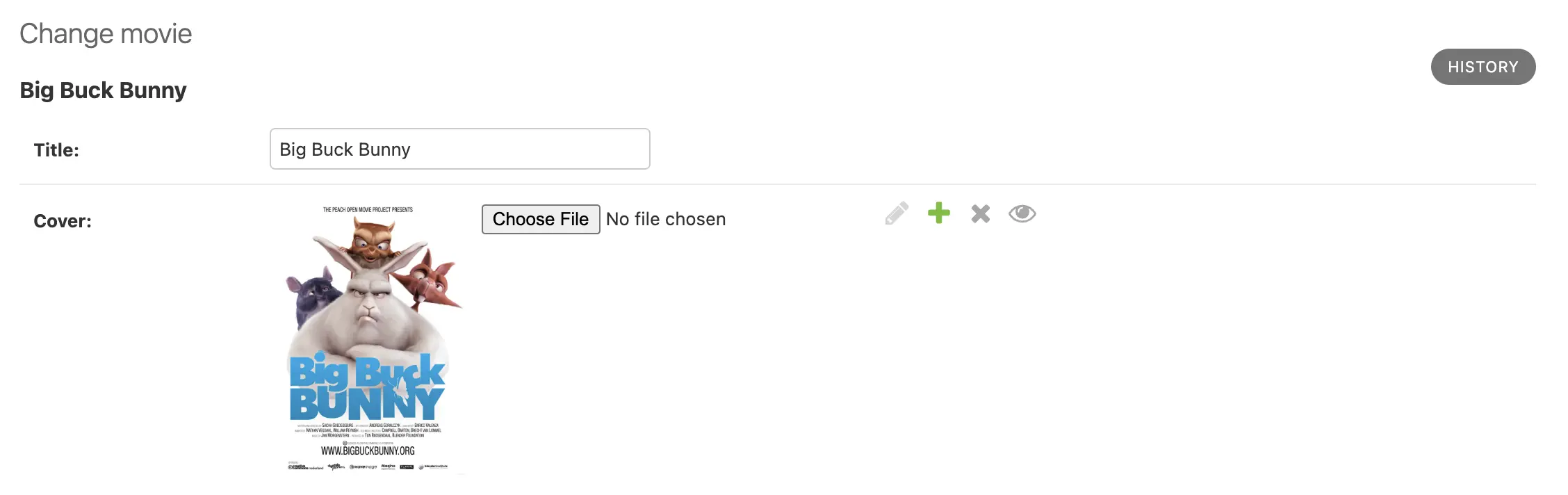
Admin integration
Django Anchor nicely integrates with the Django admin, just like File fields do.

You can get a preview of the attached file by overriding the form field for
the SingleAttachmentField model field with a widget that renders a thumbnail:
from anchor.models.fields import SingleAttachmentField
from anchor.forms.widgets import AdminSingleAttachmentInput

class MovieAdmin(admin.ModelAdmin):
    formfield_overrides = {
        SingleAttachmentField: {'widget': AdminSingleAttachmentInput}
    }
That makes the admin widget look like this: